Foxl Makes the Phone Call for You
Ask in a chat and Foxl calls for you from your Mac through your iPhone, after you approve that one call. It says it is an AI assistant first, and the chat tells you how it went.
On this page
Foxl can make a short phone call for you. Tell it in a chat who to call and what to say, and it prepares the call: the number, the message, how it will introduce itself and how long the call may run. Nothing is dialed until you approve that one call. Foxl on your Mac then places it through your iPhone, so the person sees your own number, and talks with them in Korean or English. When it hangs up, the chat says how it went and what they told it.
Calls go out from a Mac with an iPhone that allows calls on other devices, to numbers in South Korea, the US and Canada. The voice runs on Amazon's speech services with the AWS account set up on your computer, and the call itself is on your own phone plan.
A call, from the request to the result
Say your flight is late and the guesthouse expects you at six. You give Foxl their number and write: "Call the guesthouse and tell them I will get in around 11 tonight. Ask whether a late check-in is fine." If something is unclear, such as which day "tonight" is in which time zone, Foxl asks you first. Then it prepares the call, which changes nothing outside your computer: it checks the number, estimates what the call could cost at its time limit, and shows a Phone call card in the chat.
- To: who it calls, with the full number. The card is the only place Foxl shows the full number; everywhere else it hides the middle digits.
- Message: what Foxl will tell them and ask, in the words it will use.
- Introduces itself as: an AI assistant calling for you, by your name.
- Calls from: Your iPhone, through this Mac. They see your number.
- Limits: up to 3 minutes, and the most the call may cost.
- Whether a transcript is kept. By default it is, in that chat until you delete the chat.
Approve places the call and Not now drops it. One approval covers one call. The card also offers Always allow calls to the person you are calling: after that, calls to that one number skip the card while every other check still runs, and Settings > Safety lists those numbers so you can remove one. If the number or the message changes afterwards, Foxl prepares the call again and asks again. A card nobody answers expires after three minutes.
Once approved, the card follows the call through dialing, ringing and the conversation, with a Stop call button that hangs up at any point. Foxl opens with the line below. Then it says why it is calling and asks whether they have a moment, and it goes on only if they do. When the call ends, the card says how it went, such as Confirmed, Message delivered, Asked for a call back or Declined to talk with an AI assistant, with one sentence of what they said.
안녕하세요, 민준 님의 AI 비서예요. 게스트하우스 사장님 맞으세요?
Hi, this is Alex's AI assistant. Am I speaking with the guesthouse?
Foxl speaks Korean when the number is in South Korea and English otherwise. When a call to the US or Canada keeps a transcript, the opening line also says that one is being kept; on a Korean number nothing is said, and the card says the transcript stays in that chat.
What Foxl will not do on a call
- Call an emergency or premium number. Emergency and service numbers (112, 119, 911 and the like), premium-rate numbers (060 in Korea, 900 and 976 in North America) and numbers outside South Korea, the US and Canada are refused from the digits, before any card appears.
- Call on its own. A call starts only from your own chat. A schedule, a check-in, a channel, the Notes assistant, the browser extension, a Foxl Code task and a subagent cannot make one.
- Take new orders from the person it calls. During the call Foxl can do one thing besides talk, which is end the call. It politely turns down a request to pay, book, change an account, call someone else or say more about you, and offers to pass it on.
- Pretend to be you. It never uses your voice, never says it is you, and says plainly that it is an AI assistant when asked. If a voicemail greeting or a phone menu answers, it hangs up without leaving details.
- Run long. A call lasts 3 minutes by default and 5 at most. Foxl makes one call at a time and at most ten a day.
Setting it up on a Mac
Settings > Phone calls has three rows, and the same rows appear in the chat if you ask for a call before they are done:
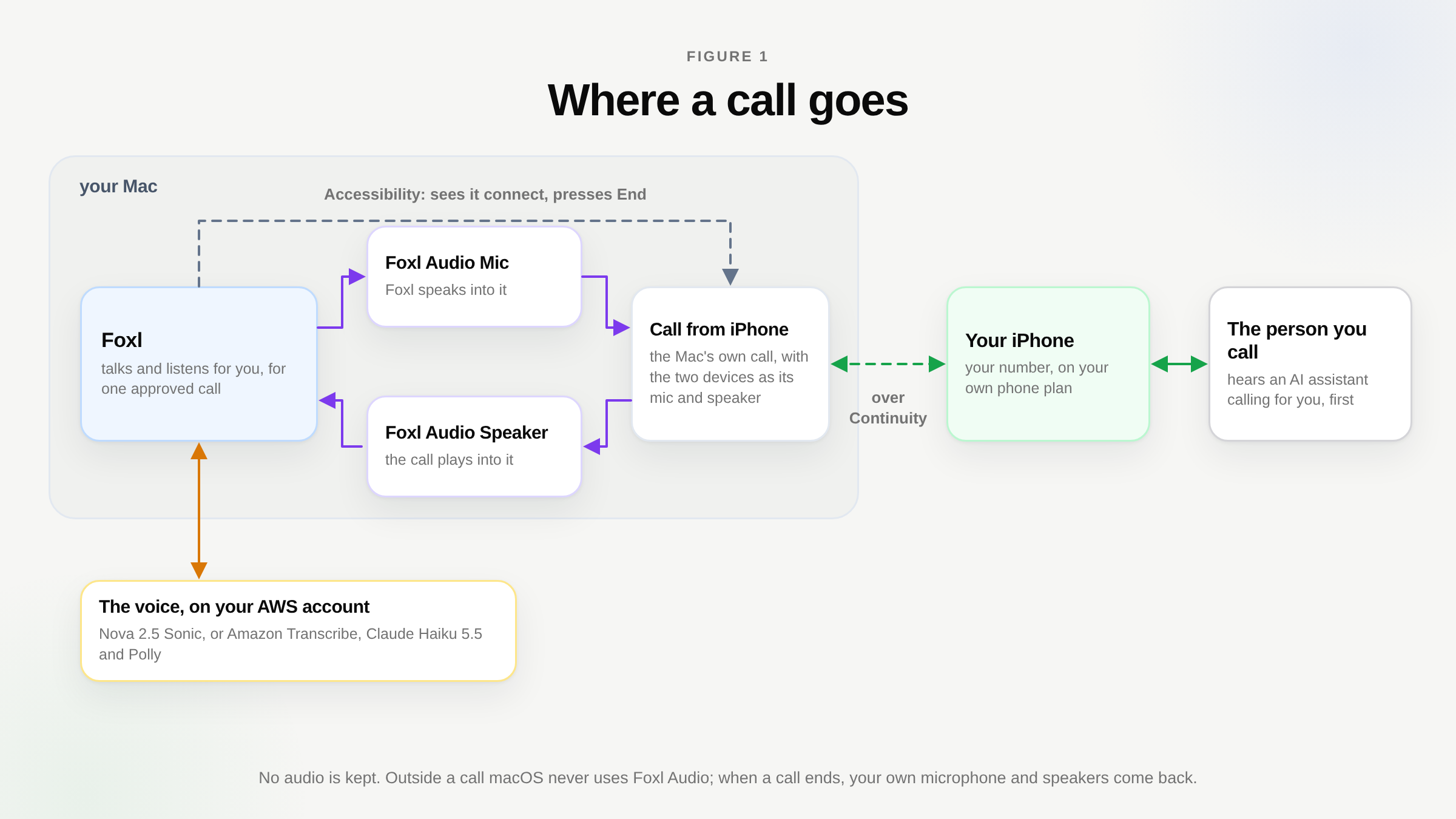
- Foxl Audio, with Install. It lets Foxl speak and listen on a call, and your Mac asks for your password once. Foxl Audio adds two audio devices of Foxl's own: one Foxl speaks into, which the call uses as its microphone, and one the call plays into, which Foxl listens to. macOS never picks them as your sound devices outside a call. During a call Foxl points the Mac at them, and puts your own microphone and speakers back when it ends.
- Accessibility, with Allow. It lets Foxl see the call and hang up. macOS gives apps no way to place, follow or end a call made through an iPhone, so Foxl reads the call's own window (the End button and the running timer) and presses End. Without this permission Foxl does not start a call, because it could not end one. For the length of a call Foxl also turns on the macOS setting that makes the call banner readable to accessibility tools, and turns it back off when the call ends.
- Your iPhone. On the iPhone, open Settings > Apps > Phone > Calls on Other Devices, turn on Allow Calls on Other Devices and switch on this Mac. On the Mac, FaceTime > Settings > Calls from iPhone has to be on. The two need the same Wi-Fi and the same Apple Account.
Under Voice, Korean speech is Nova 2.5 Sonic or Amazon Polly. AWS does not officially support Korean on Nova 2.5 Sonic and warns that recognition and the voice can be less accurate in such languages; in our own listening at phone quality it still sounded the most natural, so it is the default. Polly's Korean voices are a documented AWS offering and are one switch away. Voice region set to Auto measures which AWS Region answers fastest from your computer.
How fast it answers, and what a call costs
On the Mac route, Foxl starts answering about 1.5 to 2 seconds after the person stops talking. We measured the parts separately on October 28, 2026, on simulated calls (a scripted Korean callee spoken by Amazon Polly and sent through 8 kHz telephone audio to the real voice model) and on the Mac's own audio devices. The hop between the iPhone and the Mac is not measured yet, so the total is an estimate built from the parts.
| Part of a reply | Measured |
|---|---|
| Nova 2.5 Sonic, from the person's last word to its first reply | 0.93 to 1.20 s over four turns |
| Foxl Audio and its helper, each way | about 0.15 s (median 155 ms) |
| The iPhone to Mac hop | not measured yet |
| The whole reply on the Mac route | about 1.5 to 2 s |
Most of the model's second is spent deciding that the person has finished speaking, and it barely moved with distance: 1.40 and 1.14 seconds through Oregon, 1.47 and 1.10 through N. Virginia, 1.48 and 1.04 through Tokyo in an earlier run. A quiet line mattered more than speed. With the callee 28 dB quieter than normal, Sonic misheard them (a character error rate of 0.27); with Foxl levelling their audio first, it heard every word of the test (0.00).
Through your Mac the line is your own phone plan, priced like any call from your iPhone. The voice is billed on your AWS account, a few cents a minute: a 31-second simulated call used $0.0077 of Sonic, and the call card's cost cap budgets $0.03 a minute for Sonic and $0.05 for the Polly voice. A call's estimate at its time limit has to stay under $1.00, and a call whose live usage passes its estimate hangs up.
What is kept
- No audio, ever.
- A transcript of what each side said, as text in that chat until you delete the chat; the call card shows it when the call ends. Turn this off in Settings > Phone calls > Keep transcripts, or ask for a call without one. On a call to the US or Canada, the person hears at the start that it is being kept.
- The result in your chat is the record of the call. Logs and the result show the number with its middle digits hidden.
- During the call the audio goes to AWS for the conversation. With Nova 2.5 Sonic, the default voice, it goes to Amazon Bedrock, which AWS states does not store or review customer speech.
Limits
- A Mac with an iPhone. Windows and Linux have no way to call through your own phone yet. A developer can point Foxl at a Twilio account there, but there is no setting for it.
- The Mac's language. Foxl presses the call banner's buttons by their names, which it knows in English, Korean, Japanese, Chinese, German, French, Spanish, Portuguese and Russian. On a Mac set to another language it does not dial and says why.
- Two calling areas, two languages. Numbers in South Korea, the US and Canada; Korean for South Korean numbers, English otherwise.
- Busy looks like no answer. From the Mac's side a busy line, a declined call and one nobody picks up look the same, so the card says No answer for all three.
Questions people ask
Does the person know they are talking to an AI?
Yes. The first sentence of every call says it is your AI assistant calling, and Foxl asks whether they have a moment before it passes on your message. If they would rather not, Foxl says a short, kind goodbye and hangs up, and the card says Declined to talk with an AI assistant.
Can I ask for a call from my phone?
Yes, from the Foxl app on your phone while your Mac is on, and you approve the call card there. The call itself goes out from the Mac through your iPhone.
Can it call a restaurant and book a table?
It can call and ask, and it reports what they said. It does not agree to a payment or a booking on the phone for you. A call carries one message you approved, and Foxl tells you what they offered so you can decide.
References and further reading
- AWS: Amazon Nova 2.5 Sonic AI Service CardDocumentation
- Download FoxlReference