Foxl v0.10.6: Use Your Mac From Your Phone, and Group Conversations in Messages
Foxl v0.10.6 is out. From your phone you can see your Mac live in the chat and use it, Messages has group conversations and a new look, pasted text becomes a card you can read beside the chat, and a new chat asks where to start.

On this page
Foxl v0.10.6 is out. From your phone you can now see your Mac live in the chat and use it, and Messages has group conversations and a new look. Text you paste becomes a card you can read beside the chat, your phone's threads read more like texts, and on a computer a new chat asks where to start. Claude Fable 5.2 is here too, and GPT-6.1 Terra is now the first model Foxl recommends.
The pictures below are this release's own app, as a browser shows it on a phone or a computer, with sample data. The people, chats and notes are made up, and nothing was shared, sent or bought.
See and use your Mac from your phone
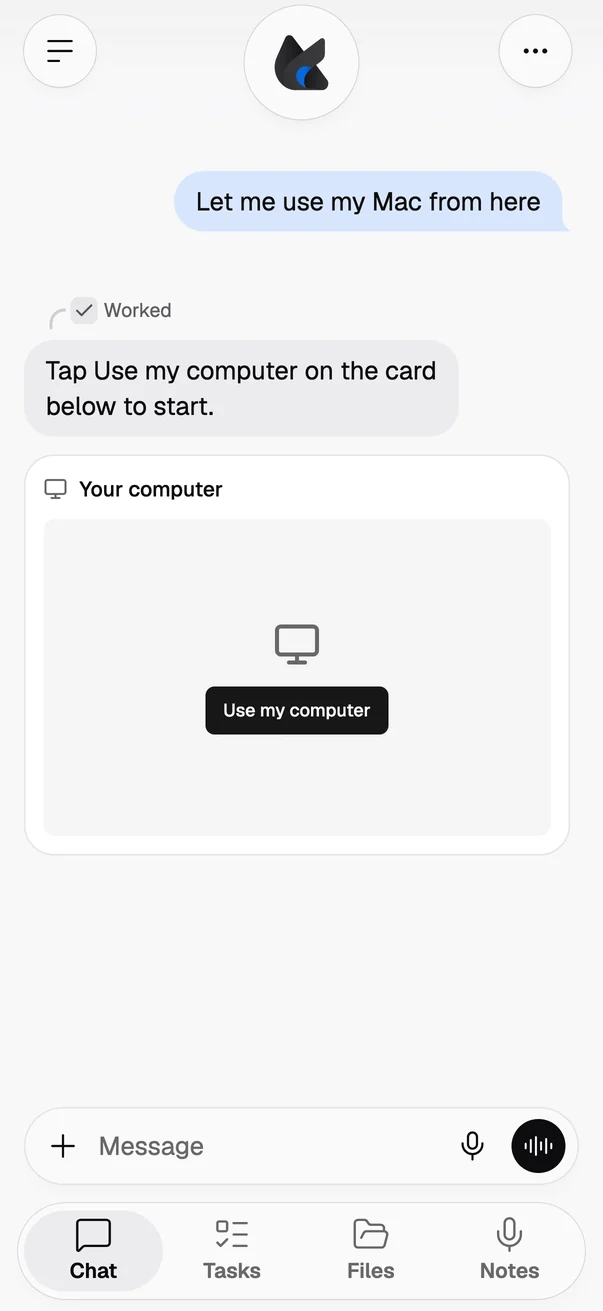
Ask Foxl on your iPhone, Android phone or phone browser to show your computer, or to let you use it. A card in the chat shows your Mac's screen live, straight from your Mac rather than through Foxl's servers. On Android and in a phone browser connected to a Mac you can also tap + and See my computer.
Take control lets you move the pointer, click, scroll and type; Give back hands control back and Stop ends it. When someone uses the Mac's own mouse or keyboard, control goes back to them at once.
Your phone must be set up to approve in Foxl on that Mac, and the Mac shows "Being viewed from" or "Being controlled from" your phone in the menu bar, with Stop, before anything is shared and for as long as it is. Two rows in Settings > Safety turn it off, and only the Mac can turn them back on. Windows and Linux computers cannot share their screen yet, and neither can a Mac while Without Node is on.
Group conversations in Messages, and a new look
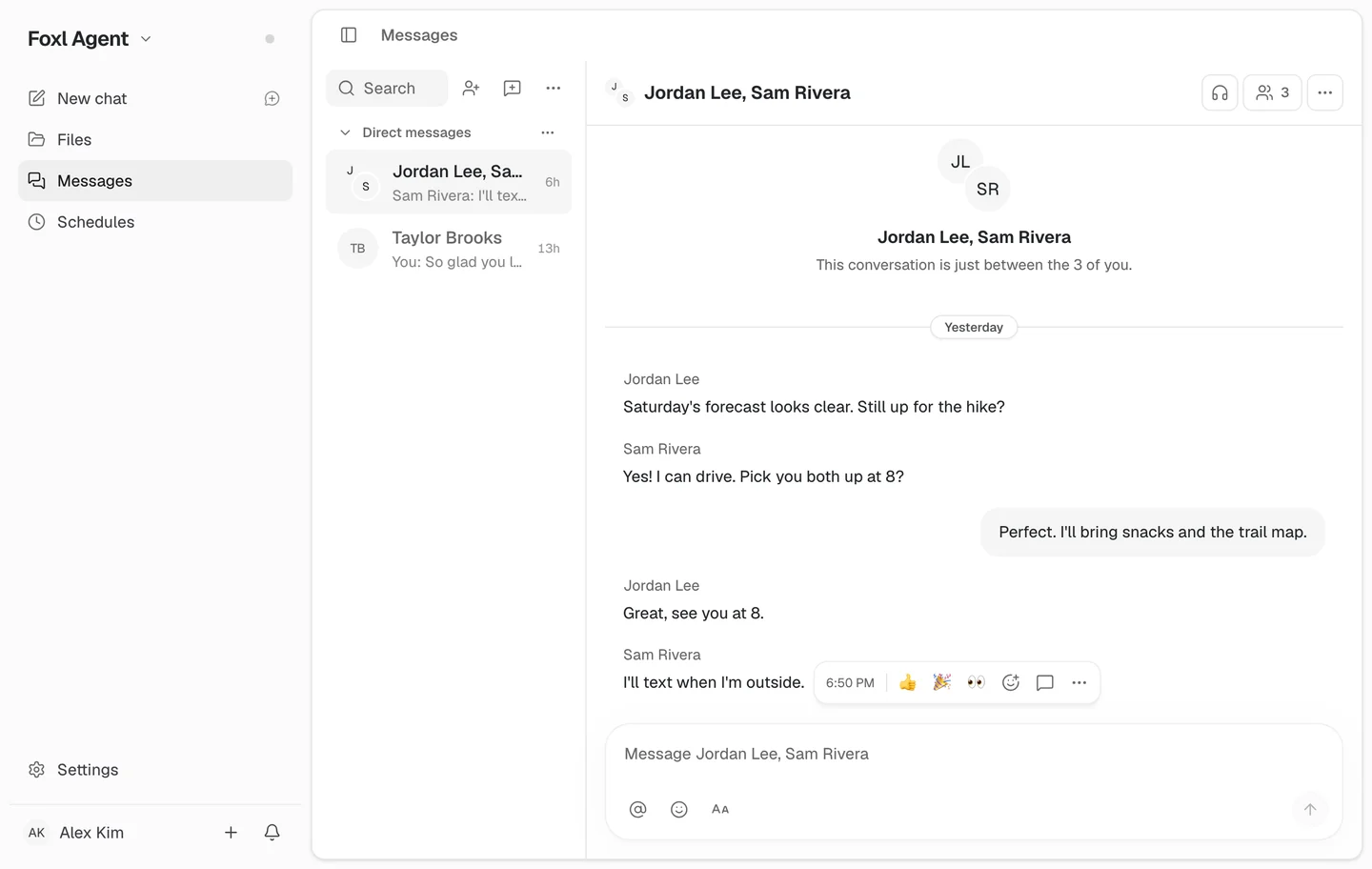
In New message, choose New group and pick two to eight of your contacts: everyone in it can write, react and reply without adding anyone. People in a group are shown to each other by their name and picture, not their email address, so each of them needs a name on their account. Choosing the same people again opens the same group.
Messages also has a new look. On a computer, the reactions and actions for a message now appear right beside it when you point at it, instead of at the far edge of the window. A conversation starts with the person, or the group, centered at the top, the list has a search field, and its headings are quieter.
Text you paste becomes a card
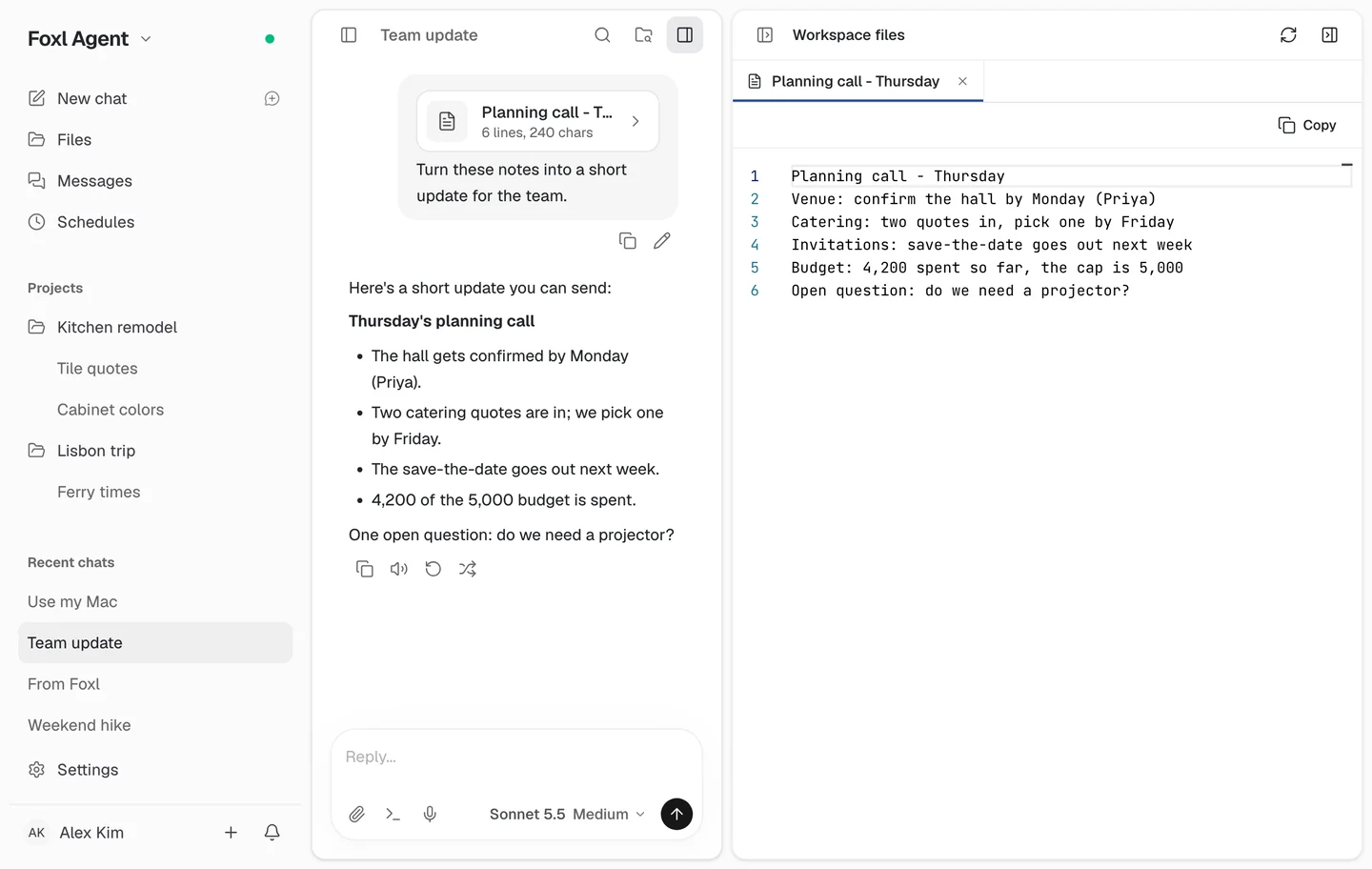
Text you paste into a message is now a card of its own in the chat, white in light mode. On a computer, click the card to read the whole paste in the panel next to the conversation, with line numbers and a Copy button, while you keep reading the chat. On a phone or a tablet, tapping the card still opens the text in place.
On your phone, threads that read like texts
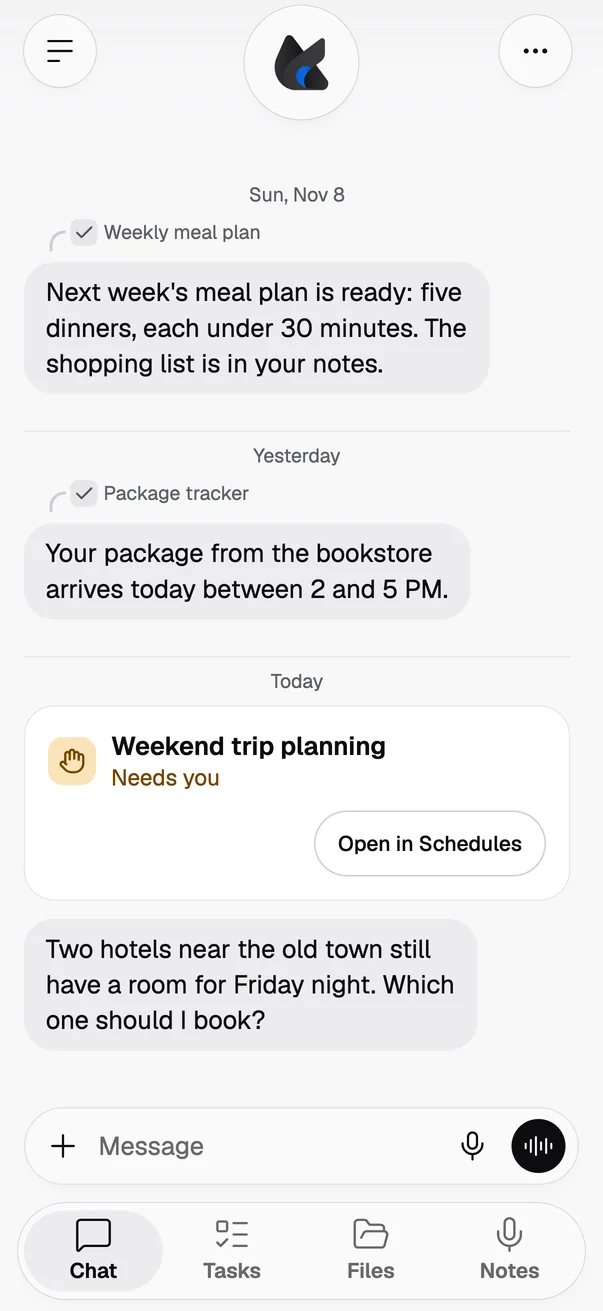
On your phone, Foxl's messages read more like texts. A chat that runs over several days marks each new day with its date. A brief, a check-in or a finished task that Foxl sends you keeps its small curved label, with an icon and its name, above the message. When you open a chat, a reply where Foxl only thought it over no longer has "Worked for" above it; a reply where Foxl looked something up or used a tool still does, and tapping that line still shows the steps.
A post from Foxl that needs you, or that failed, is now a card. A schedule's or a Foxl Code task's post that is waiting on you or went wrong shows its name, what it needs and a button to open it, instead of a line in the thread.
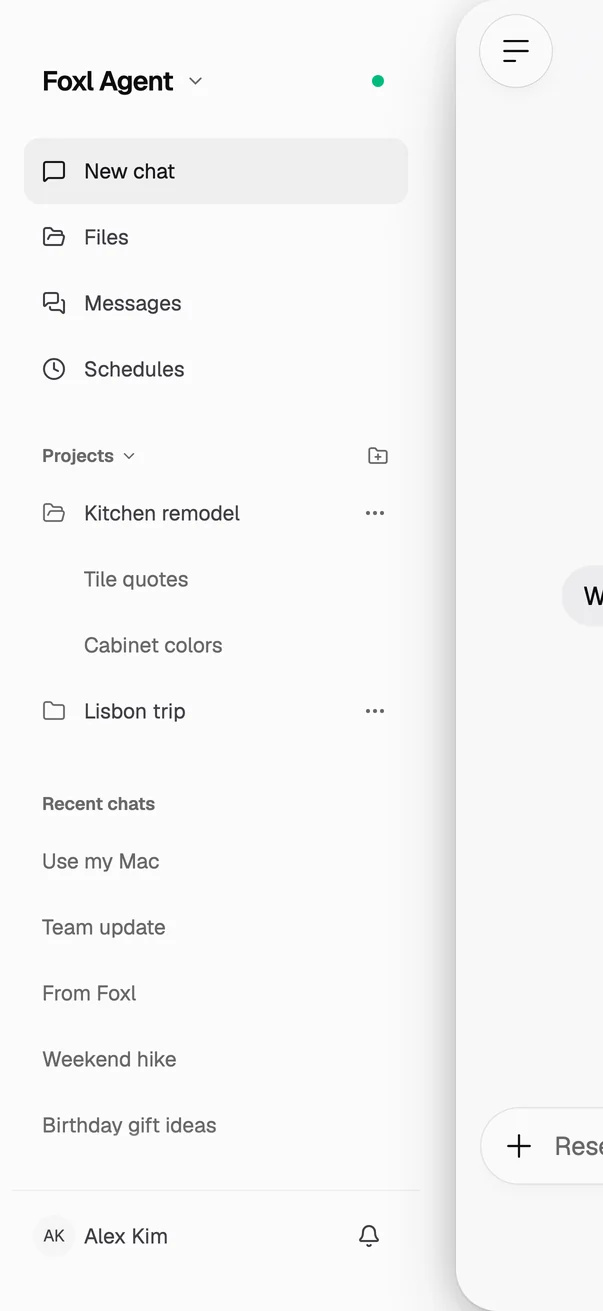
Your projects are back in the sidebar on your phone, too. On an iPhone, an Android phone or a phone browser, the sidebar lists your projects above Recent chats, as on your computer, and a chat filed in a project is in that project. Each project starts folded on a phone, so Recent chats keeps the room; tap one to open it, and it stays open. Holding a chat lists your projects under Move to project. Projects show while your computer is connected, because they live on it.
A new chat asks where to start
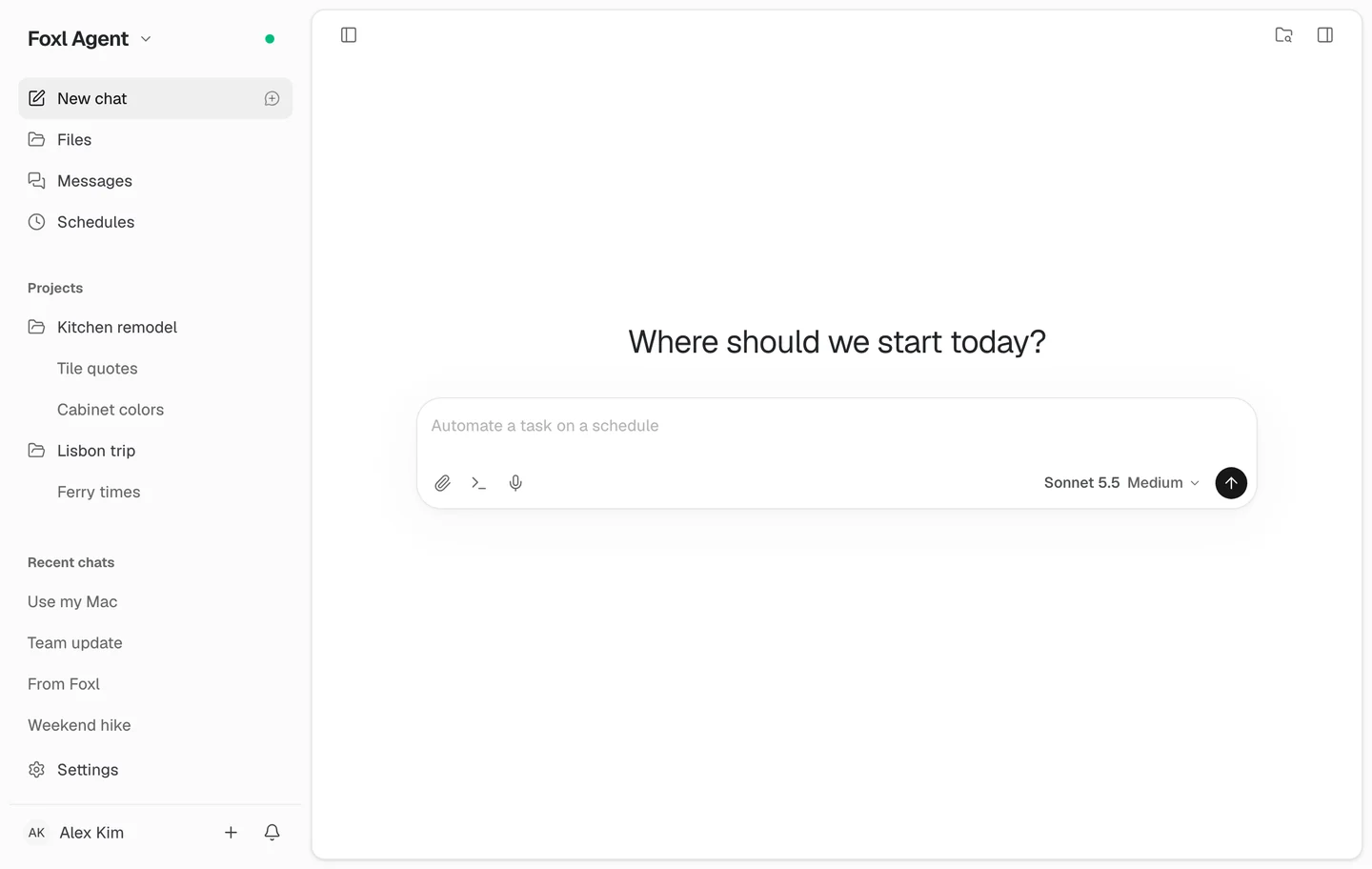
On your computer and on an iPad, a new chat now asks "Where should we start today?" in light, simple type. Foxl Code's Tasks page and app.foxl.ai before you sign in ask it too, and the quick chat on your computer reads "Ask Foxl…".
More of your recent chats fit in the sidebar. Schedules now sits right under Messages, the Extend heading is gone, and Agents moved to Settings > Subagents, with its run history. That is on your computer, on app.foxl.ai and on your phone.
Foxl on your computer looks lighter, too. Text is drawn finer, icons are thinner, and the message box is more compact, with rounder corners and a lighter, wider shadow. In the Foxl app, the bell moved to the top of the sidebar, beside the product name, and new notifications show as a small dot in your color theme; in a browser and on your phone the bell stays at the bottom of the sidebar. On a Mac with macOS 26, the window edge no longer turns grey when you switch to another app, and the sidebar is the same color as the title bar.
Also in this release
- Claude Fable 5.2: on Foxl credits (chat, Foxl Code, Remote chat and your phone), with your own Anthropic API key and with your own Amazon Bedrock account. It has a 1-million-token context window and costs less than Fable 5.1: $8 per million input tokens and $40 per million output tokens with an Anthropic API key, and AWS's $8.80 and $44 on Amazon Bedrock. Its thinking cannot be turned off; the effort level you pick sets how much it thinks. On your own AWS account, Bedrock serves it only in a Region where your account's data retention is set to AWS review. Fable 5 moves to the older models, under Settings > Model & provider > Show older model versions, and a chat or schedule already on it keeps it.
- GPT-6.1 Terra first: it is now the first model Foxl recommends, at the top of the model picker, and on your computer Foxl starts on it when you have not picked a model yet, on Foxl credits or your ChatGPT sign-in. With your own AWS account or an Anthropic API key, Sonnet 5.5 is listed first. A model you picked stays as it is.
- Reply from a notification: on your iPhone, touch and hold the notification that says Foxl answered, type your reply and tap Send; it goes to that chat and Foxl answers, without opening the app. On Android, Reply in the notification does the same while Foxl is still open in the background. On your computer, the Reply ready banner has a reply field of its own. Your computer needs this version of Foxl.
- Automatic fallback in chats: with Automatic fallback on in Settings > Model & provider, a chat whose model cannot answer is answered by the next model on your list. A short note says so the first time, and the reply's details name the model that answered.
- When the model makes Foxl wait: while the model provider is busy or limiting requests, the reply's working line reads "The model is busy. Trying again...", with the wait when it is a second or longer.
- A Safety switch for chat apps: with Ask in a chat app after Foxl reads something turned on in Settings > Safety, once Foxl reads a page, a mail or a file while replying to you in Telegram, Slack or another chat app, a call, a purchase, a calendar change or an event trigger in that conversation waits for your OK in Foxl. It is off by default.
- Clearer asks about money: when Foxl asks before a bank transfer or a trade, its card now shows the amount that will move, or says it could not read one. In your Chrome, Foxl no longer asks to send money just because a menu or a line on the page mentions a transfer; cancelling a scheduled transfer or adding a payee no longer asks either; and on the bank's last page before the money moves, Foxl asks every time, even when the button says only "Confirm".
- Notes keeps the audio: a recording cut off by a crash or a force quit now keeps its audio, in the Foxl app on your computer and in Chrome, up to about a second before it closed.
- Click to open a file: on a computer, point at a file or link Foxl names in a chat and it shows as a link; a click opens it.
- Tabs that say what is open: in a browser, the tab names the chat, note or Foxl Code task that is open, such as "Trip to Busan | Chat | Foxl".
- Files from Korean, Japanese and Chinese Excel: Foxl now reads their CSV and text files instead of showing broken characters, and says which encoding it read.
- A quicker pointer on a Mac: while you work somewhere else, a chat's pastel pointer has a soft shadow, turns toward where it is going and gets there about twice as fast. With Reduce motion on, it does not turn or sway.
The full list of changes is in the release notes, under v0.10.6.
References and further reading
- Foxl v0.10.6 release notesRelease
- Download FoxlReference