Foxl v0.2.11: The Feed - Proactive, Quietly
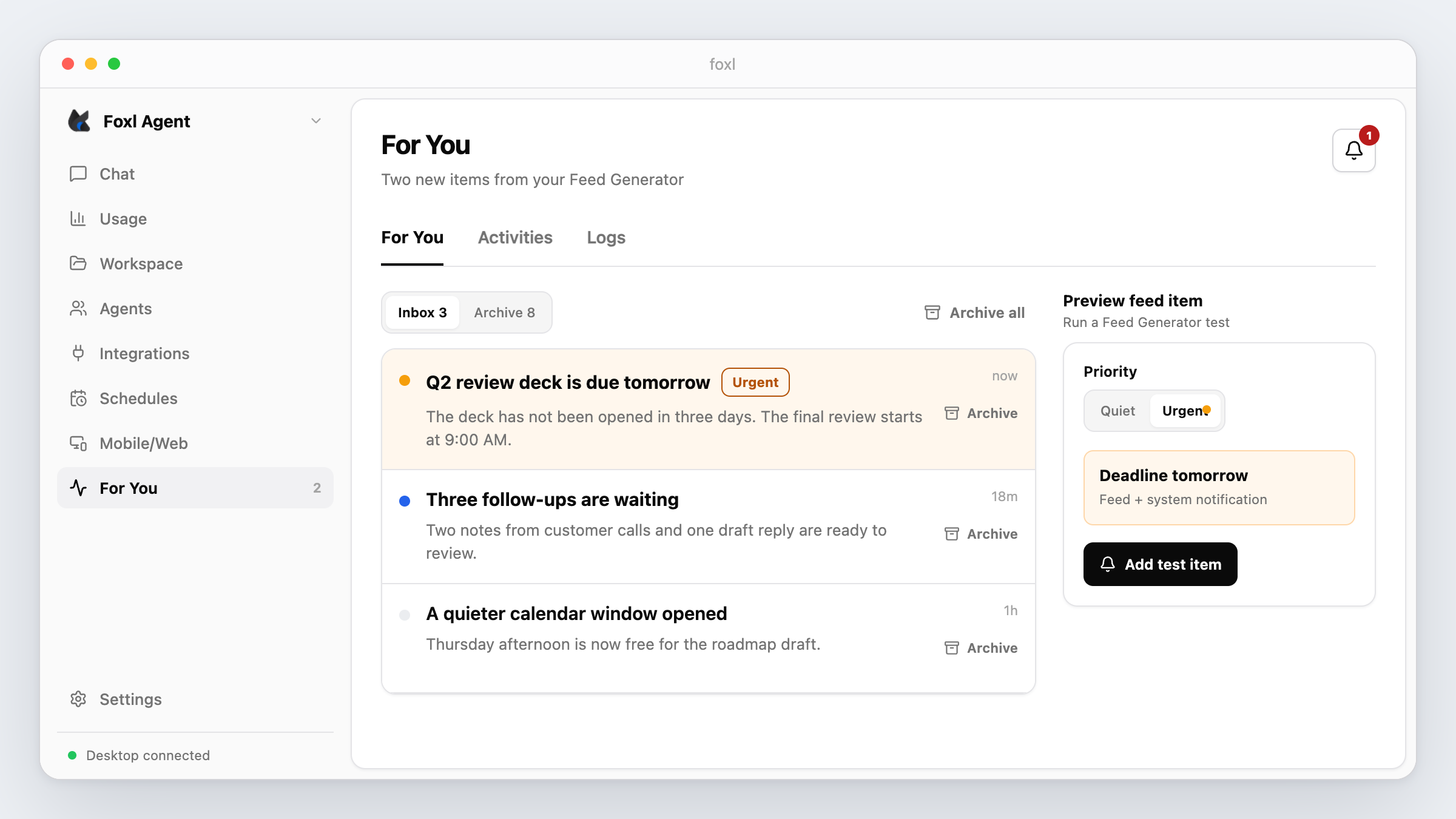
Foxl v0.2.11 added an opt-in For You feed powered by a background agent. When enabled, its default cadence was hourly; most items landed quietly and only urgent ones requested notifications.
On this page
Foxl v0.2.11 adds a feed where a background agent can post findings without a notification for each one. The Feed page replaces the old Activities view with three tabs: For You, Activities, and Logs. A new opt-in background agent called the Feed Generator is disabled by default and, once enabled, periodically decides whether anything is worth surfacing.
Why not just more notifications
An agent that turns every check into a popup gets its notifications disabled, and after that nothing it finds is seen.
The Feed Generator is allowed to produce nothing on any run. A quiet item appears only in the feed, while an urgent item also requests a system notification. The default instructions reserve urgent for deadlines within 24 hours, stuck tasks, or alerts you explicitly requested.
How it works
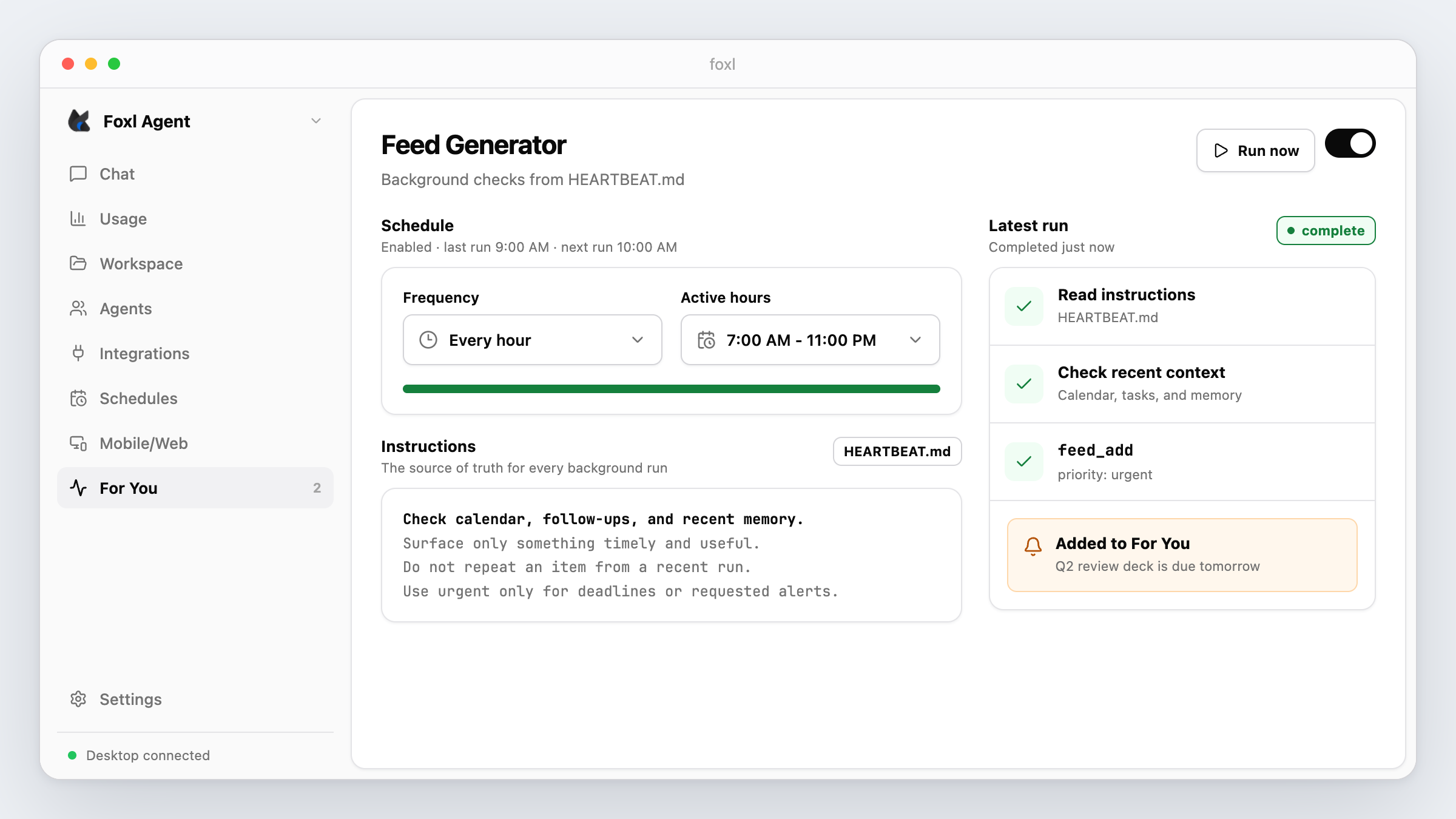
The Feed Generator is a regular Foxl agent configured by HEARTBEAT.md in your workspace. The file tells the agent what to inspect, what priority means, and what not to surface. Editing it in Settings or in the workspace updates the same source.
The default prompt tells the agent three things:
- Most runs should produce nothing. An empty run is fine.
- Don't repeat items you already surfaced recently. Check memory first.
- Don't send
urgentfor things that can wait. Spammed users disable you.
The executor gets a dedicated feed_add tool with a title, body, category, and quiet or urgent priority. Normal chat and subagents do not receive this tool, so only a Feed Generator run can add this class of item.
The For You tab
At launch, items appeared in an Inbox or Archive list. Urgent items used an amber label, and the unread count also appeared on the sidebar and desktop app icon.
UI update (May 12, 2026): v0.2.34 stopped making the whole feed row an archive target after ordinary clicks archived items by mistake. Current rows use an explicit Archive action.
For You update (June 12-13, 2026): v0.3.11 expanded the first tab into a For You dashboard. v0.3.14 removed the short-lived Personal Brain and Today Brief cards. The current view keeps upcoming schedules, today's usage, and the suggestions inbox, with Activities and Logs still available as tabs.
Settings you actually use
The old Heartbeat settings card spread its options across many separate controls. The Feed Generator card condenses status, frequency, active hours, and the HEARTBEAT.md instructions into one section. Save is disabled until something changes, and Revert discards unsaved edits.
For an enabled Feed Generator, the v0.2.11 default interval is one hour instead of five minutes. Fifteen- and thirty-minute options remain for users who need faster checks. The current morning briefing guide shows how to configure a related daily workflow.
Scheduler correction (April 18, 2026): v0.2.13 fixed the auto-seeded Heartbeat schedule and the dedicated runner both keeping timers. The runner now owns execution and the Schedules row mirrors its state. Without that patch, changing Frequency could leave the old interval firing.
Frequency update (May 11, 2026): v0.2.32 added 12-hour, once-a-day, and custom intervals up to seven days. The one-hour value remains the default, not a maximum.
Other things in this release
- Sidebar restructure. Chat, Overview, and Workspace move to the top. Agents, Tools, Skills, and Schedules move under Extend; Relay and Integrations move under Connect.
- Schedule filters. Recent Runs can hide Feed Generator internals by default or show only Heartbeat executions for debugging.
- Windows badge. The unread count gains a Windows taskbar overlay to match the macOS Dock badge.
- Skills cleanup. Bulk enable actions move into the enabled-count control, and skill cards gain context-menu actions.
- Notification settings. Feed notification controls and test scenarios move into the consolidated Notifications page.
- Logs. Live Logs move from Config to the Feed page's Logs tab while keeping the same server stream.
Known limitations
Feed Generator runs use the configured model and therefore consume provider usage. The local desktop server must be running when a check is due. Quiet and urgent classification follows the prompt and tool input; it is not a deterministic alerting system, so keep critical reminders in Foxl Schedules and tune HEARTBEAT.md conservatively.
Upgrade and verify
v0.2.11 shipped through auto-update with Feed Generator disabled by default, and existing HEARTBEAT.md files were preserved. After updating to a current patch, enable it in Settings, save a small test instruction, and use Run now. A quiet test should appear only in For You; an urgent test should also produce a native notification when OS permission and Foxl notification settings allow it. Keep a copy of custom instructions before replacing an older template.
Read the full Foxl changelog or download the Foxl v0.2.11 GitHub release.
References and further reading
- Morning briefing guideDocumentation
- Scheduling in FoxlDocumentation