Run Gemma 4 Locally on Your Computer, Free and Offline, with No Terminal
To run Google's Gemma 4 on your own computer (a Mac with Apple silicon, or a Windows or Linux x64 PC) without a terminal, choose Download under Settings > Model & provider > On this device in Foxl: it brings the model and the engine that runs it, and then you chat with it offline, with no API key and no account. Which of E2B, E4B and 12B fits your memory, what it can do in Foxl, and what it cannot, with real screenshots of v0.9.2.
On this page
To run Google's Gemma 4 on your own computer without a terminal, install Foxl, open Settings > Model & provider > On this device and choose Download next to a Gemma 4 model. Foxl downloads the model and the engine that runs it, and once it is ready you can chat with it in Foxl Agent: free, with no API key, no account and no other app, and it keeps working with no internet connection. It runs on a Mac with Apple silicon, a Windows x64 PC or a Linux x64 computer.
What is Gemma 4?
Gemma 4 is Google's family of open-weight models: you can download the model itself and run it on your own hardware, under the Apache 2.0 license. The small ones, E2B and E4B, are made to run on an ordinary computer. A cloud chatbot runs its model on the provider's servers; a model on your computer answers from your computer, so what you type does not have to leave it.
How do you install Gemma 4 without a terminal?
- Install Foxl on a Mac with Apple silicon, a Windows x64 PC or a Linux x64 computer.
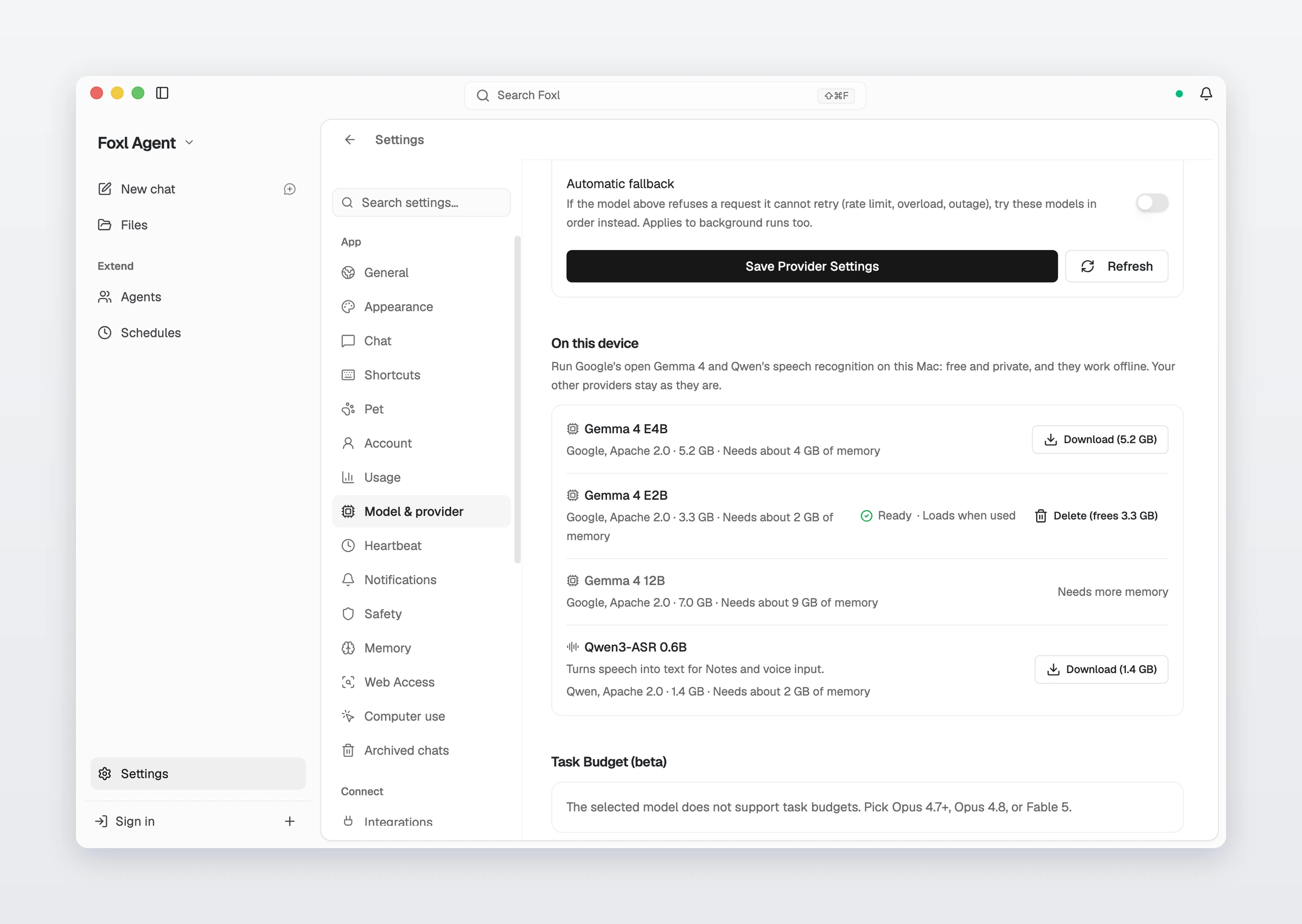
- Open Settings > Model & provider and scroll to On this device.
- Choose Download next to Gemma 4 E2B or Gemma 4 E4B. The button shows the download size. You can pause the download and pick it up later, and the file is checked when it finishes.
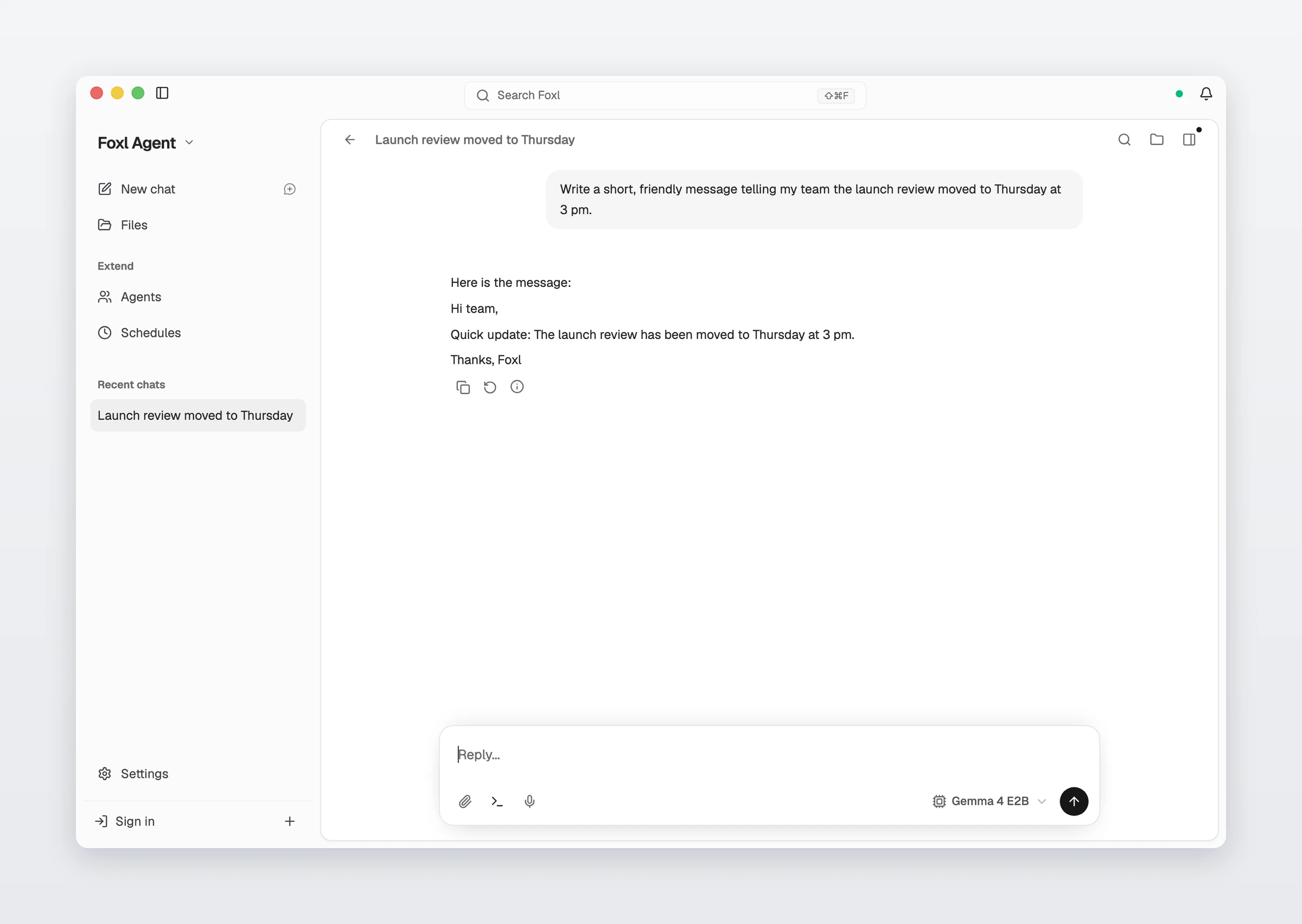
- When the row says Ready, start a chat. If nothing else on the computer can answer a chat, Foxl picks Gemma 4 for you; otherwise choose it in the model menu under the message box.
An empty chat with no model offers the same download as Run AI on this Mac (Run AI on this computer on Windows and Linux).
Which Gemma 4 model should you pick?
- Gemma 4 E2B: a 3.3 GB download, for computers with 8 GB of memory or more.
- Gemma 4 E4B: a 5.2 GB download, for 16 GB or more. Foxl recommends it when the computer has the memory.
- Gemma 4 12B: a 7.0 GB download, for 32 GB or more.
A model the computer cannot run says Needs more memory instead of offering a download. Each model reads up to 32,768 tokens of conversation at a time, or 65,536 on a computer with 32 GB of memory.
What can Gemma 4 do in Foxl?
It answers chats, and it can use a short set of tools: reading and writing files, running shell commands, reading web pages when you are online, keeping a checklist and recalling earlier conversations. Foxl gives the on-device model fewer tools than a cloud model so that a new chat still fits in its window: MCP servers, connected apps, the browser, schedules and subagents stay with cloud models. Foxl Notes can also use it for summaries.
Does it really work offline?
Yes. After the download, the model and its engine are files on your computer, and Foxl talks to the engine on the computer itself. While making this guide, the only network connections the engine had during an answer were to Foxl on the same computer. Reading a web page is the one tool that needs a connection.
What does it not do?
- It does not run on an Intel Mac, or on Windows or Linux on Arm.
- It is a small model. For long, hard tasks a large cloud model does better, and your other providers stay as they are, one pick away in the same menu.
- It does not bring other open models. For those, Foxl also connects to Ollama and LM Studio.
References and further reading
- Foxl docs: On this device (Gemma 4)Documentation
- Gemma 4 model overview (Google AI for Developers)Reference
- Gemma 4 E2B, QAT q4_0 GGUF (Hugging Face)Reference
- Gemma 4 E4B, QAT q4_0 GGUF (Hugging Face)Reference
- llama.cppReference
- Download FoxlReference