Computer use on Mac: let an AI agent use your apps
Turn on computer use in Foxl, give macOS two permissions, and an AI agent presses buttons and types in your Mac apps with its own pointer. Which models do it well, measured, including OpenRouter and free ones.
On this page
Computer use means an AI agent can look at an app on your Mac and operate it: press buttons, type, scroll and read the result back. Foxl is a free desktop AI agent that does this with any model that can read images, from Amazon Bedrock, OpenRouter and the other providers it supports. Turn on Allow computer use in Settings, give macOS two permissions, and ask in plain words. Foxl asks before it uses each app, works with its own pointer so yours stays free, and only ever looks at the window of the app it is using.
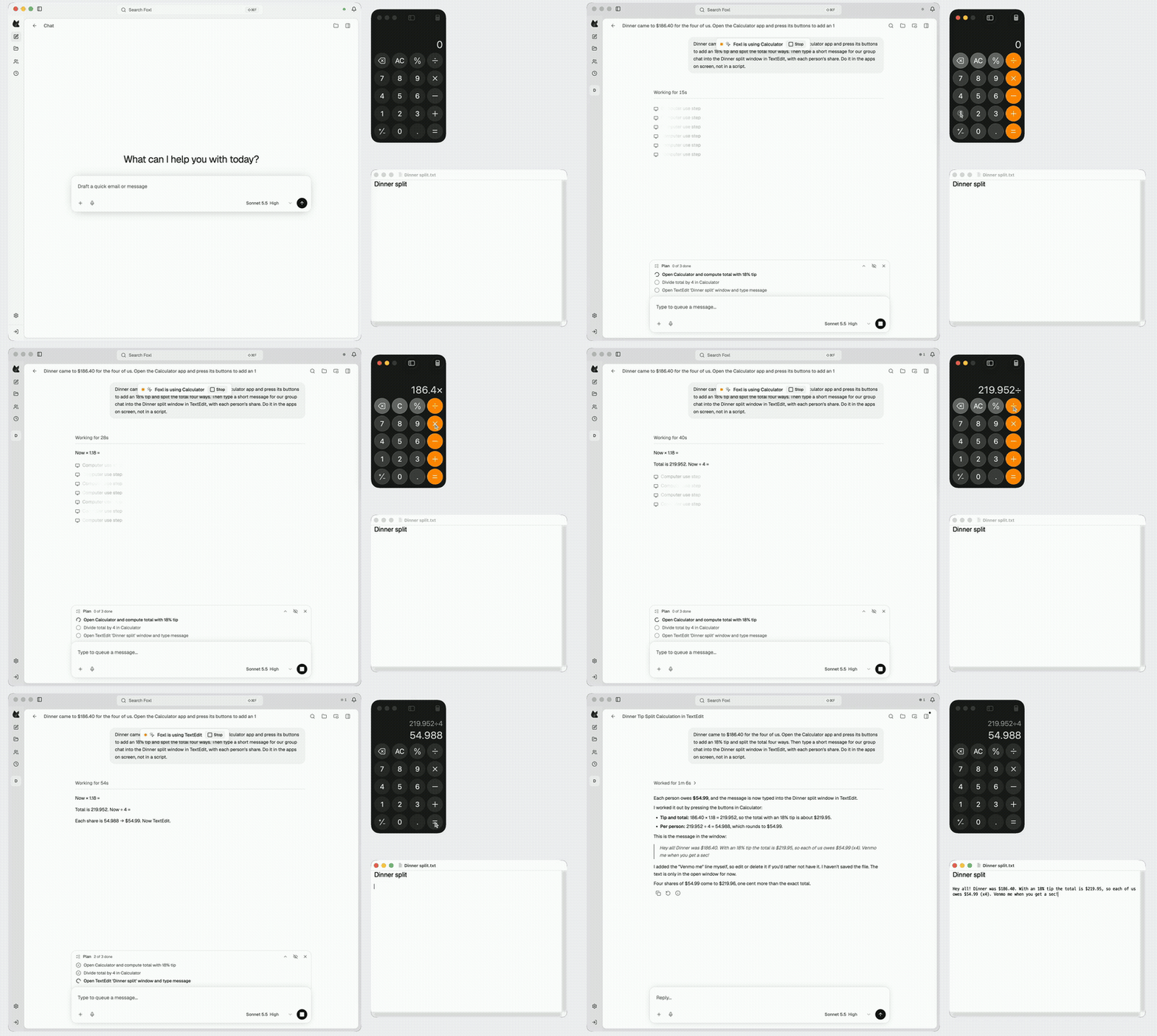
The video above is a real run. Asked to split a dinner bill, Foxl opened Calculator, pressed 186.40 × 1.18 ÷ 4 on its keypad, read 54.988 off the display, and typed a message with each person's $54.99 into a TextEdit note, in a minute and six seconds.
What you need
- A Mac with macOS 13 or later. Computer use is Mac-only for now: on Windows and Linux the setting says so.
- Foxl, free from foxl.ai. You do not need a Foxl account for this.
- A model that can read images. Settings > Model & provider sets it up; Use OpenRouter in a desktop app and the Amazon Bedrock guide walk through the two used here.
Step 1: Turn on computer use
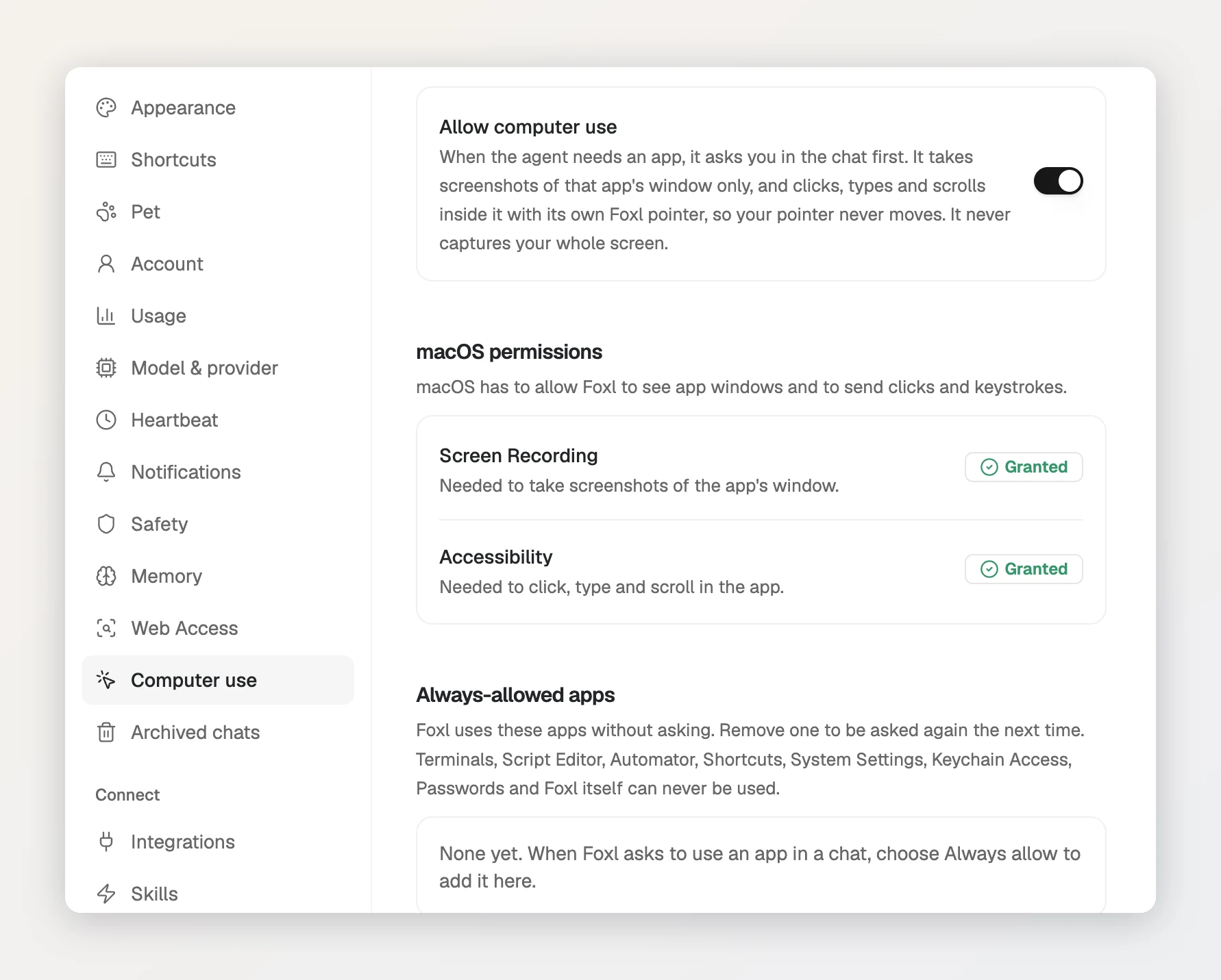
- Open Settings, then Computer use.
- Turn on Allow computer use. It is off until you do.
- Under macOS permissions, press Open settings next to Screen Recording and Accessibility and switch Foxl on in each. macOS needs the first so Foxl can take a screenshot of the app's window, and the second so it can click, type and scroll in it. Quit and reopen Foxl afterwards, and both rows read Granted.
Step 2: Ask, and allow the app
Start a new chat and say what you want done in which app. The first time a chat needs an app, Foxl asks in the chat: Allow Foxl to use Calculator? with Deny, Allow and Always allow.
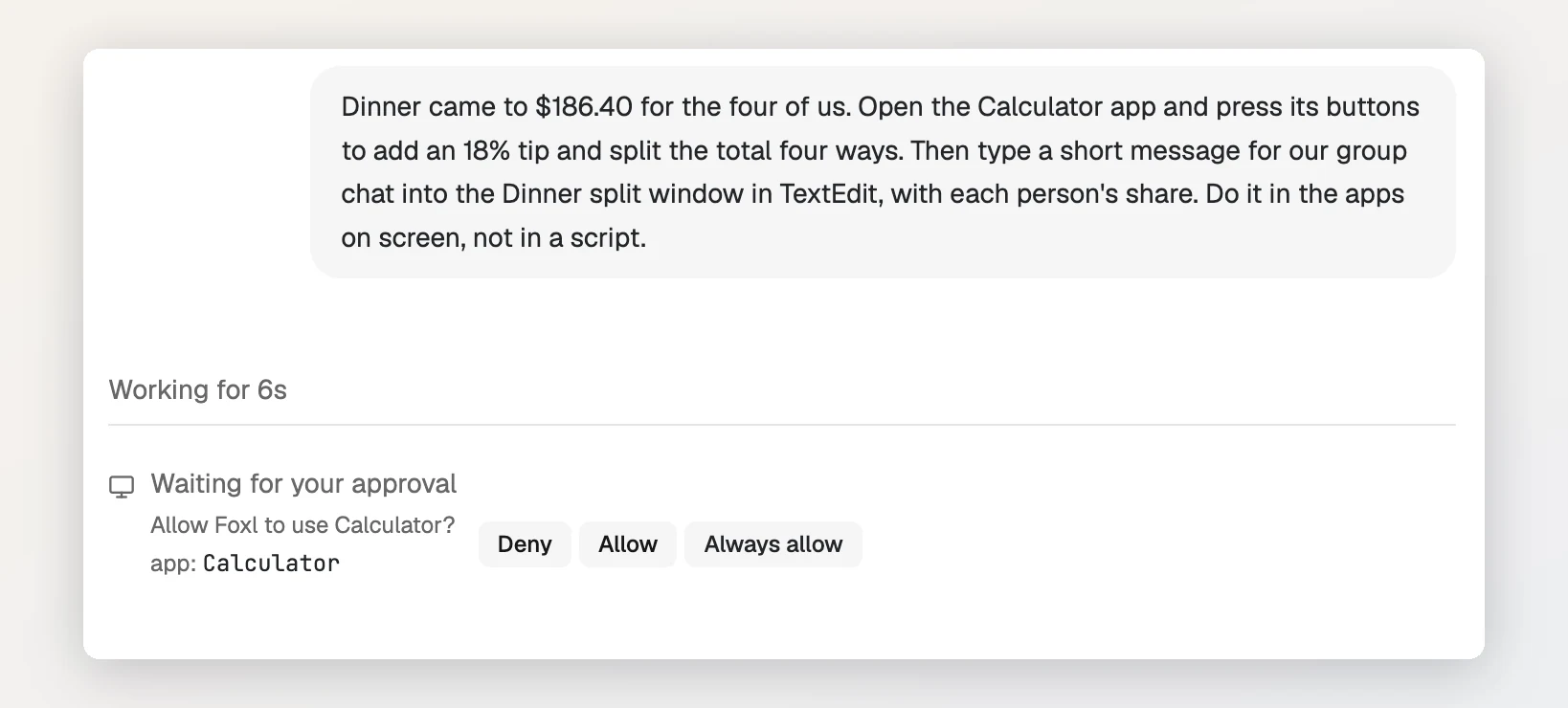
- Allow lets this chat use the app until you press Stop, turn computer use off, quit Foxl, or leave the app unused for an hour.
- Always allow saves the app under Always-allowed apps in Settings, and Foxl stops asking for it. Remove it there to be asked again.
- Deny stops that step, and the agent is told you said no.
While it works, a Foxl is using Calculator bar shows in the window and in the macOS menu bar, with a Stop button that ends it at once. The agent also keeps a short plan above the message box and ticks each step off.
Which models can do computer use?
Every step of computer use answers with a screenshot, so the model has to read images and call tools. Foxl checks this itself: a model that cannot view images does not get the computer use tools, and if you ask it to use an app it tells you to switch to one that can. For OpenRouter models Foxl reads OpenRouter's own catalogue, where 272 models took both images and tools on the day we looked.
Being able to see is not the same as being good at it. We gave the task in the video to several models on the same Mac on October 8, 2026:
| Model | Through | What it did |
|---|---|---|
| Claude Sonnet 5.5 | Amazon Bedrock | Finished both apps in 1 min 6 s, right to the cent (the video) |
| Claude Haiku 5.5 | OpenRouter | Pressed the right Calculator buttons and typed the right TextEdit message |
| Qwen3.7 Flash | OpenRouter | Kept pressing the wrong Calculator buttons and fell back to typing |
| dots-3 note preview (free) | OpenRouter | Answered, but pressed the same few Calculator buttons for ten minutes |
| Gemma 4 31B and 26B (free) | OpenRouter | Rate-limited by the upstream provider (429) for more than two hours |
| Free Models Router | OpenRouter | Picked from the free models above, with the same results |
The Claude models are the safe choice for now. On OpenRouter, Claude Haiku 5.5 is the cheapest of them; on Bedrock, the same models run on your own AWS account.
Can I use computer use with free OpenRouter models?
Sometimes, and not reliably yet. OpenRouter has seven free models that take images and tools, and its Free Models Router picks one that supports what a request needs, so choosing Free Models Router in Foxl is the easy way to try. Three things get in the way, all of which we hit while making this guide:
- Each step is a request. The task above took 24 steps, and free models allow 50 requests a day until you have bought 10 credits (then 1000).
- The free pool is shared. The two Gemma 4 models answered 429 for more than two hours, and the free models that did answer were not good at pressing the right button.
- A key with no credits cannot run long paid requests. OpenRouter checks each request against your balance before it runs, and a computer use step carries a screenshot and the conversation so far, well over 10,000 tokens. On a key with no credits it was refused with
402 Prompt tokens limit exceeded, even when the request ran on our own provider key.
If you only see does not have enough credits on a short request, lowering Maximum reply length (tokens) in Settings > Model & provider > OpenRouter can be enough, because OpenRouter reserves that whole length up front. For regular computer use, buy a few credits or use a model you already pay for.
What does computer use do to my mouse and screen?
Nothing you have to stop for. Foxl presses buttons, fills in text fields and scrolls through macOS Accessibility, the same channel screen readers use, so your pointer never moves and you can keep working in another app. A small gray pointer of Foxl's own glides to each control so you can watch what it does. The app it uses is not brought to the front for every step; only a shortcut with Command, Control or Option needs the app in front, so Foxl brings it forward for a moment and then puts your app back.
Foxl only takes screenshots of the front window of the app it is using, never of your whole screen. Some apps can never be used at all: Terminal and other terminals, Script Editor, Automator, Shortcuts, System Settings, Keychain Access, Passwords and Foxl itself. Commands go through Foxl's own tools instead, and those apps hold passwords and security settings.
Native Mac apps that describe their controls to Accessibility, like Calculator and TextEdit here, work best. Apps built on Chromium or Electron describe little of their pages, so many clicks inside a web page are refused and the agent falls back to the keyboard. For websites, the Foxl browser extension is the better tool.
Questions people ask
Is computer use free in Foxl?
Foxl is free and the feature costs nothing on its side. You pay for the model, at that provider's prices. Free OpenRouter models can do it on a good day, with the limits above.
Does it work on Windows or Linux?
Not yet. Computer use is Mac-only in Foxl today; on Windows and Linux, Settings > Computer use says it is available on macOS only for now.
Can it see my whole screen?
No. It takes screenshots of the window of the app it is using, and only after you allowed that app in the chat.
Can I use it from my phone?
You can start the chat from the Foxl iPhone app, and the work runs on your Mac. Allowing an app is the one step that has to happen in Foxl on the Mac: the phone shows Waiting for approval on your Mac until it is allowed there.
References and further reading
- OpenRouter: Free Models RouterDocumentation
- OpenRouter: API rate limitsDocumentation
- Foxl docs: Computer UseDocumentation