Foxl v0.2.23: Notifications That Actually Do Something
Type-specific notification actions, resource identifiers carried end to end so a click opens the exact agent, schedule, or conversation, and an intermediate macOS Install Now repair. The remaining native failures were fixed in v0.2.29 and v0.2.30.
On this page
Published on May 4, 2026, this post records the notification routing changes shipped in Foxl v0.2.23. The release connected server metadata, WebSocket delivery, Electron notifications, the in-app notification list, and resource-specific navigation.
Shipped behavior
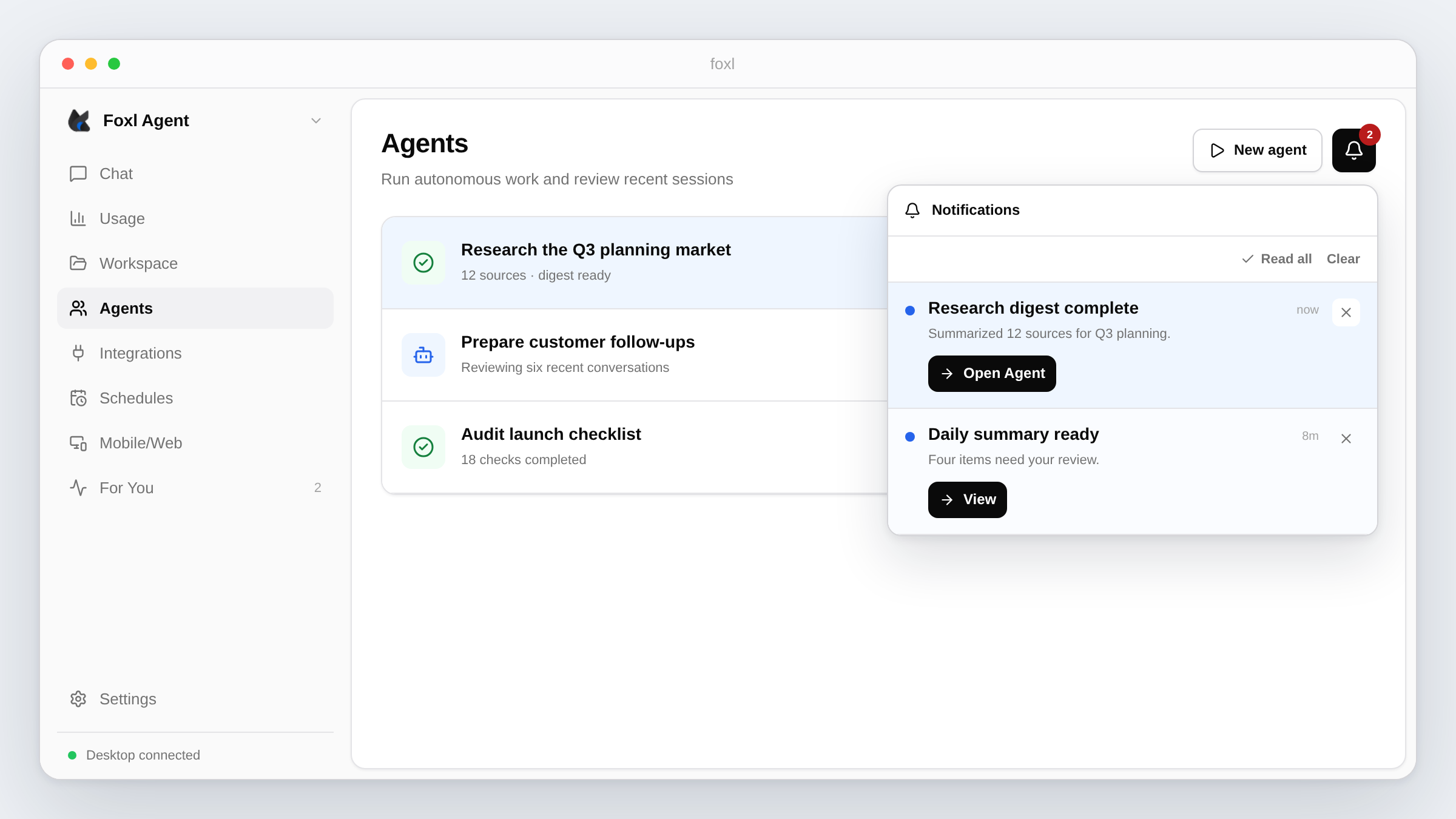
Agent, schedule, channel, chat, and feed notifications received type-specific actions in v0.2.23. The release action labels included Open Agent, View, Reply, and Dismiss. Native action buttons were a macOS capability; Windows and Linux relied on the in-app notification list for equivalent controls.
Notification metadata was forwarded with the event instead of being discarded:
- Agent events carried agent, session, and conversation identifiers.
- Schedule events carried the schedule identifier and name.
- Channel messages carried conversation and channel identifiers.
v0.2.17 had already established body-click routing. v0.2.23 carried resource metadata end to end so both a notification body click and its primary action could resolve a specific destination. At release, an agent notification targeted /agents/:sessionId, a schedule targeted /schedules#scheduleId, a channel message targeted /chat/:conversationId, and a feed alert targeted /activities.
Update action
v0.2.23 changed the packaged update path to set autoInstallOnAppQuit, stop the child server, defer quitAndInstall(true, true) with setImmediate, and fall back to app.quit() if the native call threw. This changed how the update was applied, but later releases found two more macOS failure modes.
Agents and Settings
The Agents page merged live team members into database-backed session history so a running chat agent could appear in the list. Running sessions also bypassed the selected historical time window and rendered in an Active group.
The Settings test picker stopped inserting a renderer-only CustomEvent. It called POST /api/test/notification, received the event over WebSocket, and used real recent ids where available. This exercised more of the production route while remaining a test-notification path.
Implementation implication
The routing contract crossed several ownership boundaries:
- The server emitted a notification type and a metadata object.
- The renderer stored the event and forwarded actions plus metadata to Electron.
- Electron retained the metadata in click handlers and sent it back in an app command.
- The renderer resolved the action to a route and resource id.
Dropping metadata at any step degraded a deep link to a list page. The release added focused Playwright coverage for server delivery, metadata propagation, Settings scenarios, in-app actions, and history navigation.
Known limitation and follow-up
Playwright could validate the server, WebSocket, renderer, and browser history portions. It could not drive a native macOS notification banner or prove that Electron kept the native action listener alive until a user clicked it. The packaged update flow therefore still required a manual release check.
Correction: May 6, 2026
v0.2.24 simplified notification actions to one Open button. Dismiss moved to an X control in the in-app list, and the native macOS banner relied on its own close affordance. The type-specific multi-button layout documented above was short-lived.
Correction: May 10, 2026
v0.2.29 fixed the native macOS Install Now action again. In v0.2.23 the Notification object was local to the IPC handler and could be collected before the user clicked, which detached its action listener. The later fix retained live notifications in a process-level map and also removed stale update-ready entries after an update.
Correction: May 11, 2026
v0.2.30 removed another update race: the native action handler focused the main window before applying the update, which could conflict with shutdown. The corrected path skips that focus step and defers installation. The v0.2.23 post therefore should not be read as proof that Install Now was reliable on packaged macOS builds at that time.
How to verify
- Use the Settings test picker and confirm the event arrives through the WebSocket-backed notification list.
- Open the notification and confirm the current Open action lands on the specific agent, schedule, conversation, or feed page.
- Run the notification Playwright specs for server and renderer routing.
- For updates, test a signed packaged macOS build with a real downloaded update. Browser automation is not sufficient for the native action.
References and further reading
- Download and update FoxlDocumentation
- Foxl release historyRelease