Foxl v0.2.27: Trimming the Sidebar, the Skill Library, and the Tray
Integrations became third-party only, the default skill set was reduced, and redundant built-in tools moved behind the general execution path. The release also simplified the tray and exposed credit usage in the account surface.
On this page
Published on May 9, 2026, this post records the integrations, skills, tools, tray, and account changes shipped around Foxl v0.2.27. Several navigation and packaged-app outcomes changed immediately afterward, so the dated corrections below are part of the record.
Shipped behavior
Integrations and Skills were separated by purpose
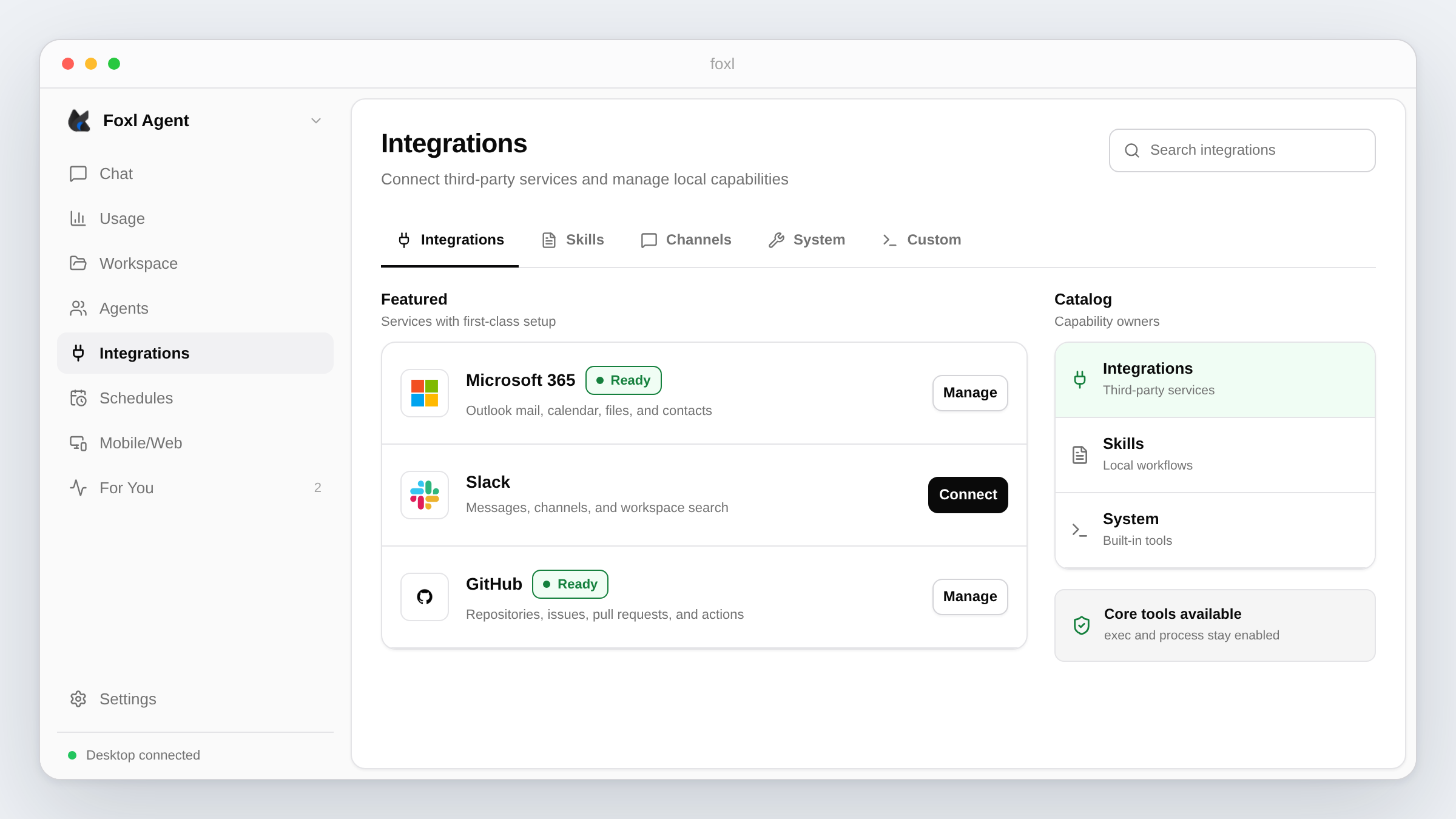
The Integrations page switched from including every skill with requires metadata to an explicit allowlist of third-party services. Microsoft 365 and Slack remained OAuth integrations. SaaS-oriented skills such as GitHub, Notion, Google Workspace, Outlook, and Spotify could also appear there.
Local document processors, coding helpers, and developer tools stayed in the full Skills catalog. Both views changed the same enabled state through the skill enable and disable endpoints. At the tagged v0.2.27 source, Integrations was the sidebar entry point, with Integrations, Skills, and Channels in header tabs. Tools was still paired with Agents until the next release.
The skill library was trimmed
The release changelog records 32 skill removals and a smaller default-enabled set. It also removed skill folders that duplicated native Slack and Discord channel adapters. The monorepo stored the external skill-library location as a path pointer rather than a content snapshot, so this post does not present a durable total for the catalog.
The dedicated git tool was removed
The structured git tool was deleted from the registry and tool profiles. Git operations were expected to run through exec, preserving arbitrary flags and shell composition. That preserved a route to git only when exec itself was available.
Integration setup moved into dialogs
Microsoft 365 and Slack opened a connection dialog before launching the browser OAuth flow. Skills with environment requirements used the same dialog shell for local credential entry. This was a preflight and configuration UI; OAuth authorization still occurred in the provider's browser flow.
Channel rows also received explicit icon paths instead of depending on a missing icon field.
The tray menu was simplified
The tray menu source was reduced to recent conversations, seven-day usage, New Chat, Open Foxl, and Quit Foxl. It fetched recent conversations and usage when rebuilding the menu instead of polling continuously.
Account and credential controls
The sidebar account popover added tier and credit-usage information. The skill credential store wrote UI-entered environment values to local agent_memory entries and merged them into subprocess environments.
Implementation implication
Integrations used an explicit SKILL_CATEGORY map. A skill not in that map could still exist and be enabled on the Skills page without appearing as a third-party integration.
Stored skill values took precedence over same-name shell variables in v0.2.27:
return { ...baseEnv, ...stored };This corrects the original post's claim that the shell always won. Deleting the stored value restored the shell value as the fallback. The API exposed names and readiness separately from the stored values:
GET /api/integrations/skillslisted normalized requirements and readiness.PUT /api/integrations/skill-env/:namestored a value.DELETE /api/integrations/skill-env/:nameremoved it.
Known limitation and follow-up
Skill inventory was mutable and maintained outside this monorepo, so totals in UI copy and release prose became stale quickly. Eligibility also depended on each machine's binaries, environment, platform, and enabled state; a catalog total did not describe the tools available to a particular agent.
The release source implemented the new tray content, but the packaged app did not initially provide the connection data needed by its menu requests. Development behavior alone did not verify the installed build.
Correction: May 9, 2026
v0.2.28 moved System and Custom tools under the Integrations header tabs. It also fixed the packaged tray so recent chats and seven-day usage could load, stopped a tray-icon click from forcing the main window open, and avoided an empty first menu. The sidebar order described in the original v0.2.27 post was already obsolete.
Correction: May 10, 2026
v0.2.29 removed the numeric skill-library claim from onboarding after the displayed count changed from 73 to 68 to 35. The original post's "19 of 35" statement also conflicted with its own 21-item default list, so that count is withdrawn rather than carried forward.
Correction: May 11, 2026
v0.2.31 made exec and process unconditional core tools. In v0.2.27 they were still gated by the exec-tool skill, so disabling that skill could remove the replacement path for the deleted git tool.
Correction: May 28, 2026
The original post named Opus 4.7 as the app default. v0.2.45 changed the default Opus tier and the legacy claude-code/opus alias to Opus 4.8 while retaining the explicit Opus 4.7 entry. Model defaults are release state, not permanent product behavior.
How to verify
- Enable or disable an allowlisted service from Integrations and confirm the same state appears in Skills.
- Inspect
GET /api/integrations/skillsand verify it reports requirement names and readiness without returning stored credential values. - Confirm current tool output includes
execandprocessbut no dedicatedgittool. - Verify recent chats and usage from a packaged tray build, not only Electron development mode.
References and further reading
- Current Foxl skillsDocumentation
- Current Foxl toolsDocumentation